On November 17, 2026, one week after OpenAI opened Business Hub, we claimed the AI Guys business profile on ChatGPT. Before we started, we asked ChatGPT two questions about our own market. The answers showed us why every business should claim its profile, and what a profile can and cannot do for you.
This is the full record: what ChatGPT said about us, every setup screen, the traps we hit and the checklist we now use for clients. For the background on Business Hub, its reports and SEO, read our companion guide, ChatGPT Business Profile: What It Is and What It Means for Your Business.
The short version: OpenAI lists no fee to claim your business, and you do not need an ad account. Claiming gives you control of the details ChatGPT shows, a dashboard of mentions and website clicks, and a blue verified check after an ID review. It does not move you up in ChatGPT's answers, and OpenAI says so plainly. Claim it now, then earn the recommendations with reviews, directory listings and a clear website.
What ChatGPT said about us before we claimed
We opened a temporary chat with memory and personalization turned off, so ChatGPT had nothing from our account to lean on. Then we asked: "What does AI Guys in Richmond, Virginia do?"
The answer was accurate. ChatGPT named both founders, listed our three service lines, gave our phone number and sales email, and repeated the two-week website timeline from our site. Every detail traced back to aiguys.net.
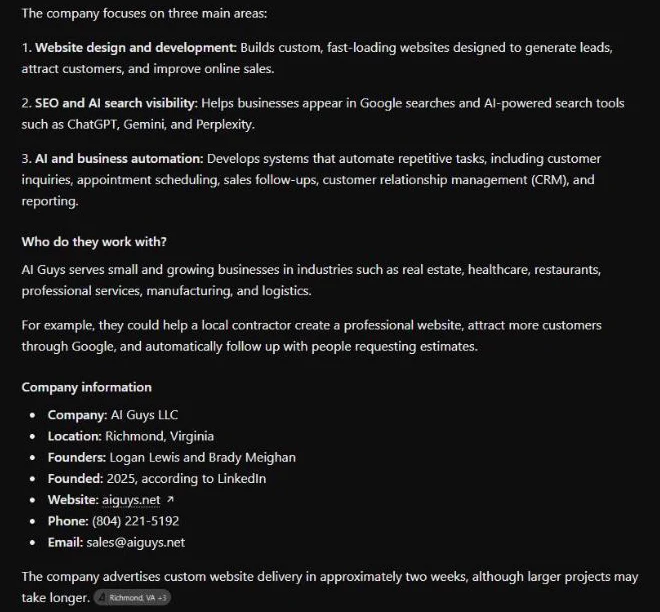
Two lines stood out. ChatGPT said we were founded in 2025, "according to LinkedIn." Our own website said 2024 at the time. ChatGPT went with the other source, and the other source was right. We fixed our site the same afternoon. In another run, ChatGPT added that the results on our website "have not been independently verified." ChatGPT reads more than your website, and it reads your claims with a skeptical eye.
Then we asked the question a real customer asks: "Who are the best marketing agencies in Richmond, Virginia for a small business?" ChatGPT searched the web and answered with six agencies. Each one showed up as a card with a star rating, a review count and a pin on a map. The review counts ran from 1 to 103. ChatGPT said it compared specialties, small-business focus, public reviews and independent agency directories, and it cited a directory site.
That is the lesson in two answers. ChatGPT can already describe your business when someone asks for you by name. Getting named when a stranger asks for a recommendation takes more work, and that second answer is where new customers come from.
Why every business should claim its ChatGPT profile
OpenAI says 1.2 billion people use ChatGPT every week. In the US, the Pew Research Center found that 44% of adults say they use ChatGPT, up from 34% a year earlier. BrightLocal's 2026 consumer survey found that 45% of US consumers used ChatGPT or another AI tool for local business recommendations, which made AI tools the third most popular source of business recommendations. The visitors it sends are worth having. Adobe found that AI-referred visitors to US retail sites converted 90% better than visitors from email, paid search and social in September 2026. When a business appears in a ChatGPT answer, people can click through to its ChatGPT profile. As of November 10, 2026, that profile is something you can claim and correct. Here is what claiming gets you.
- Control of your details. Your business can already have a profile built from other sources. OpenAI's policy says profiles can include information from other sources. Claiming lets you correct your website, description, category and contact details.
- First claim takes the admin seat. If someone else claims your business first, getting it back means a dispute and an ID check. At launch, Search Engine Roundtable's Barry Schwartz wrote that he was "honestly nervous about people hijacking businesses" in Business Hub.
- Numbers you cannot get anywhere else. Business Hub reports mentions and website clicks, with 7-day and 28-day views on our dashboard, plus discovery topics.
- A verified badge. A blue check appears once your identity check is approved.
- A Business Agent, if you qualify. Eligible US ecommerce and online service businesses can publish an assistant that answers customer questions from their own information.
- No fee and no ad account. OpenAI lists no fee to claim, and you do not need a ChatGPT Ads account or an enterprise contract.
What claiming will not do: [OpenAI's help center](https://help.openai.com/en/articles/20001635-setting-up-your-business-on-chatgpt) says claiming "doesn't guarantee increased visibility or give you direct control over ChatGPT's independent recommendations." Treat the profile as accuracy and data, not ranking.
What to have ready before you start
- A ChatGPT account you will keep. The account that claims the business becomes its admin, so use a company login.
- One way to verify: your business phone, your business email, your domain's DNS settings or your Shopify store.
- A government-issued ID and your business registration details for the Persona identity check.
- Your category. Pick the one that matches your Google Business Profile.
- A description of 300 characters or less.
- Your logo, plus your delivery and return policy wording.
- Your phone in hand, if you want the number on the profile. Adding it sends a code to that number.
How we claimed our business on ChatGPT, step by step
- 1
Open Business Hub
Go to chatgpt.com/business-hub. OpenAI's help center says to open Business Hub from the sidebar. It did not show in our sidebar, but the direct address worked.
- 2
Find or add your business
Search for your business by name. An eligible online business with no match can add one. Local stores and restaurants can currently claim only an existing US listing.
- 3
Verify that you control the business
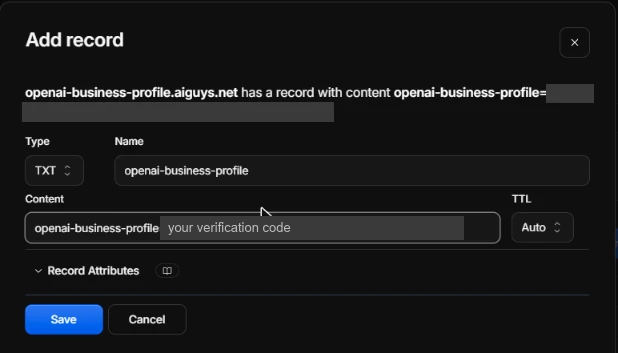
We used our website domain. ChatGPT gave us a TXT record with the host openai-business-profile and a value that starts with openai-business-profile=. Enter only that host in your DNS settings, since most providers add your domain on their own. Our record expired 24 hours after ChatGPT showed it, so add it the same day. We checked it in public DNS before we clicked Verify, and it showed up within a minute.
- 4
Tell ChatGPT how customers reach you
The first question asks whether customers visit a physical location or buy through a website. We have no storefront, so we chose website. Pick the option that matches your Google Business Profile.
- 5
Add your website
Enter your main website address.
- 6
Choose one category and write your description
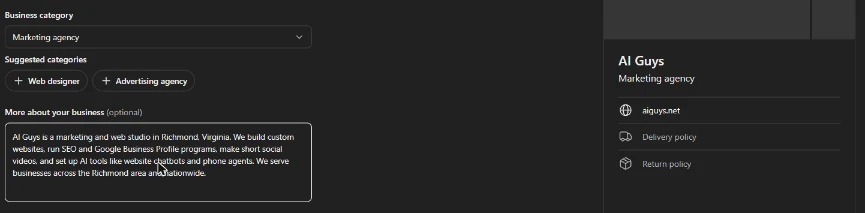
ChatGPT filled in our category as AI company. You get one category, and the suggested buttons below the field replace your choice instead of adding a second one. We picked Marketing agency to match our Google Business Profile. The More about your business box stops at 300 characters with no counter, and it cut our 532-character Google description off mid-word. Write a version under 300 characters first.
- 7
Add your contact details
Phone and email are optional. Adding a phone number sends a one-time code to that number by text or automated call, so keep the phone nearby. Never share that code with anyone.
- 8
Check your draft profile
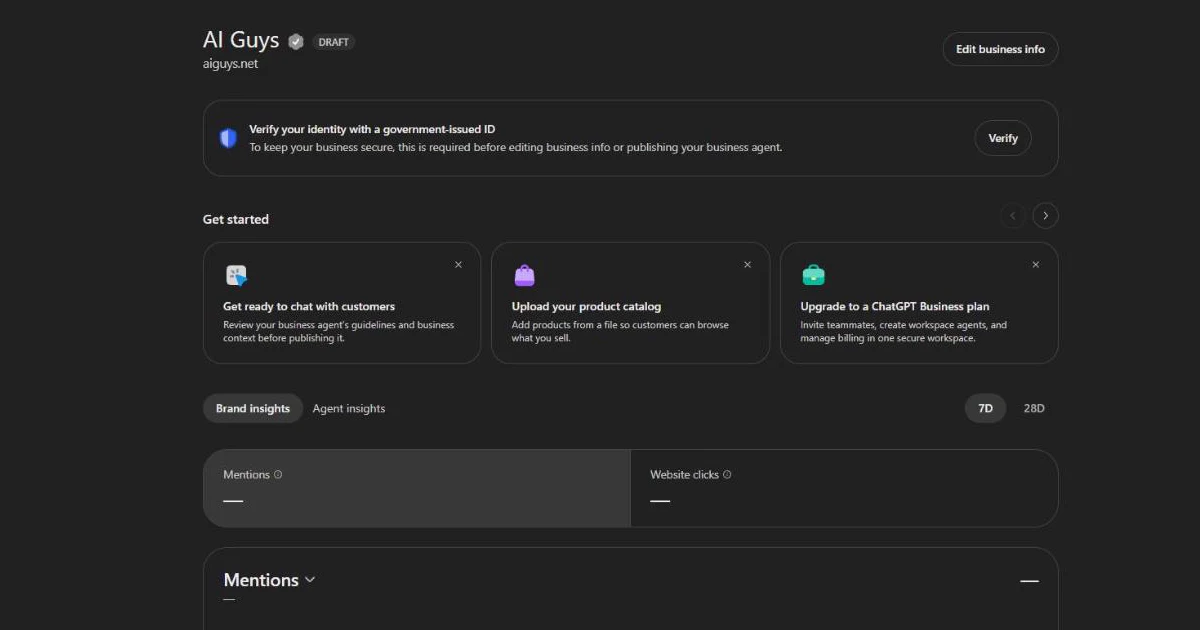
After the code, we landed on our overview. It showed a Draft label, a banner asking for a government-issued ID, empty Mentions and Website clicks tiles, and shortcuts to build an agent or upload a product catalog.
- 9
Do the Persona ID check last
Persona verification unlocks editing, the activity reports and the blue check. OpenAI says approval publishes a new profile automatically, and its support team cannot unpublish a published profile. Finish every detail before you submit your ID.
7 mistakes to avoid when you claim your ChatGPT profile
- 1Typing your full domain into the TXT host field. Many DNS providers add the domain for you, so you end up with a doubled name that never verifies.
- 2Letting the TXT record expire. Ours expired 24 hours after ChatGPT showed it. Add it the same day, then check it before you click Verify.
- 3Keeping the category ChatGPT picks for you. Ours did not match our main business. Use the category that matches your Google Business Profile.
- 4Pasting a long description. The box stops at 300 characters without a warning.
- 5Leaving old facts on other sites. ChatGPT took our founding year from LinkedIn, not our website. Check LinkedIn, Google, Facebook, Yelp and your industry directories for the same name, phone, hours and dates.
- 6Submitting the ID check before your details are ready. Approval publishes the profile on its own.
- 7Paying anyone to verify your profile, or sharing your codes. OpenAI lists no fee, and the admin can add an agency in Business Hub with its own login.
How to get into ChatGPT's recommendations
Claiming fixes your details. Getting recommended is a separate job. In our test, ChatGPT built its shortlist from four things it named itself: specialties, small-business focus, public reviews and independent directories. That points to a short list of work.
Do not count on your Google Business Profile to carry over. A BrightLocal study of about 200,000 local searches found that Google Business Profile data is "hardly used by ChatGPT," and that business websites made up 42% of all citations.
- Reviews with real detail. Every agency ChatGPT recommended showed a star rating and a review count. Ask happy customers to review you on Google and on the directories in your industry.
- Directory listings. ChatGPT cited a directory site in its answer. List your business on the directories your customers use, with the same details as your website.
- A website that says what you do, for whom and where. ChatGPT described us correctly. Our site spells it out. Give each service and each area you serve a clear page.
- Crawler access. OpenAI's crawler documentation says sites that opt out of OAI-SearchBot will not be shown in ChatGPT search answers. Check your robots.txt file and your firewall settings. OpenAI says a robots.txt change takes about 24 hours to register.
- The same details everywhere. Your ChatGPT profile, website, Google Business Profile and directory listings should match.
None of this is a special AI trick. Google treats AI search as part of SEO, and the same basics work in ChatGPT. Our guide to AI SEO in Richmond walks through what gets local businesses found. Our Google Business Profile guide covers the local side, and our guide to local SEO for service area businesses covers the website side.
How to track your ChatGPT results
Business Hub reports mentions and website clicks over 7 or 28 days. For an online business, a mention counts when ChatGPT references your website. For a local business, it counts when ChatGPT shows your location in an answer. Write the numbers down once a month next to your Google Search Console data, so you can compare both search engines side by side. Our tiles were empty on day one, which OpenAI says is normal until activity passes its reporting threshold.
How AI Guys can help
We claimed our own profile first. Now we set up client profiles from experience, not guesswork. If you want help claiming your ChatGPT business profile, matching it to your Google Business Profile and earning the reviews and listings that drive recommendations, we can do it with you. See how our SEO and AI visibility program works.
Frequently Asked Questions
How long does it take to claim a business on ChatGPT?
The setup screens take a few minutes once your details are ready. Verification adds time: a DNS record has to show up in public DNS, OpenAI reviews each claim, and the Persona ID check needs its own approval.
Is claiming a ChatGPT business profile free?
OpenAI lists no fee to claim a business, and you do not need a ChatGPT Ads account. Digiday reported at launch that Business Hub is free for now, and that OpenAI did not rule out a paid model later. You need a ChatGPT account, a way to verify the business and a government-issued ID for the Persona check.
What is the character limit for the ChatGPT business description?
The More about your business box stopped at 300 characters when we set up our profile on November 17, 2026. It shows no counter, so write your description in a document first and keep it under 300 characters.
Can a ChatGPT business profile have more than one category?
Not when we set up ours. The category field takes one value, and the suggested categories below it replace your choice. Pick the category that matches your Google Business Profile's primary category.
How do I verify my business on ChatGPT with a TXT record?
Choose website domain verification in Business Hub. Add a TXT record with the host openai-business-profile and the value ChatGPT shows you. Click Verify once the record shows up in public DNS. Enter only the host, since most DNS providers add your domain on their own.
What if someone already claimed my business on ChatGPT?
Open the profile, select the more options menu and choose Dispute ownership. You then verify with Persona that you can represent the business. Disputing ownership does not change the profile's visibility in ChatGPT.
Will claiming my profile get my business recommended by ChatGPT?
Not by itself. OpenAI says claiming does not guarantee more visibility. In our test, ChatGPT built its recommendations from reviews, directories and business websites, so put your effort there.